Adapting tooling workflows can pose a significant challenge for graphic designers and teams striving to keep their creative process efficient and collaborative. How do you ensure that evolving tools enhance productivity rather than disrupt it? Whether you are working solo or part of a larger creative department, upgrading or changing your tooling approach requires strategic planning and practical methods to get the most out of your design resources.
This article offers actionable strategies to help graphic designers optimize their tooling workflows. It also provides an easy-to-use template to assess tooling changes, ensuring your team stays agile and responsive. Additionally, if you find yourself overwhelmed, the guide touches on when to consider graphic design for hire services to support your projects.
Assessing current tooling: First steps to smoother workflows
Before switching to a new tool or modifying your existing setup, understanding your current workflow’s strengths and weaknesses is essential. Conduct an audit focused on these questions:
- What software and collaboration tools are currently in use?
- How do these tools integrate with each other?
- Where are the bottlenecks or inefficiencies?
- Is the team’s skill set aligned with available tools?
- How do deadlines and project outputs respond to current tooling?
According to Smashing Magazine, many teams experience slowdowns due to underestimated integration issues between new and existing tools. Clarifying your baseline workflow efficiency helps identify gaps more accurately.
Embracing change without losing productivity
Tooling shifts often meet resistance because learning curves affect project velocity. Minimize this risk by implementing these strategies:
- Involve the entire graphic design team during the evaluation stage to gather diverse input and ensure buy-in.
- Provide accessible training materials tailored to your specific tools and workflows.
- Phase rollouts over several weeks rather than sudden overhauls.
- Assign “tool champions” within the group who can assist peers and streamline troubleshooting.
- Schedule regular check-ins to adapt the new workflow based on user feedback.
These steps ensure change becomes a collaborative effort rather than a top-down imposition.
Template for evaluating tooling changes
Below is a simple template to assess potential or ongoing tooling shifts within your graphic design projects or teams:
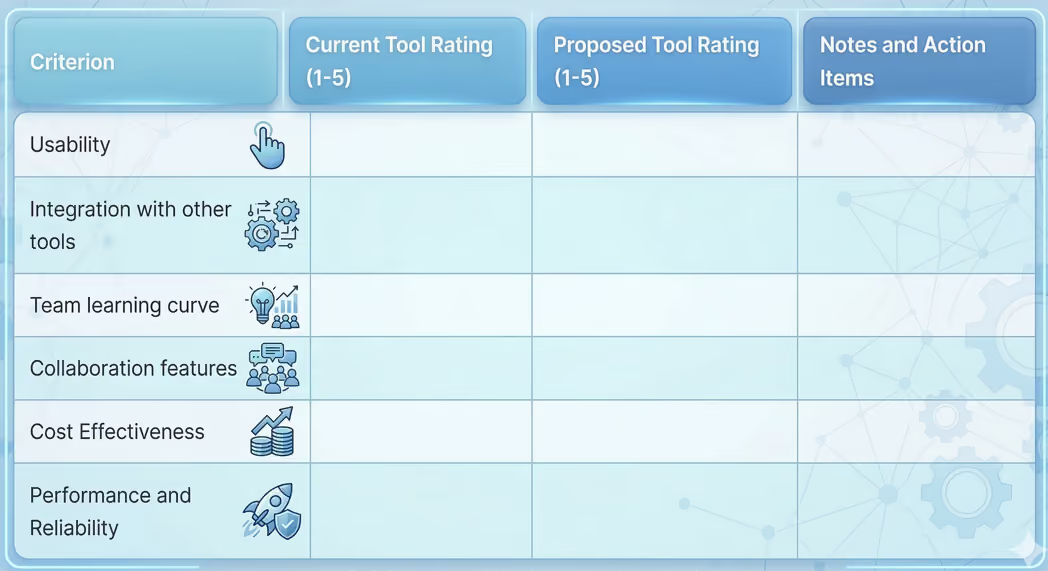
Use this template in team meetings to guide objective decision-making and track tool adoption progress.
When to hire a graphic designer or outsource design work
If tooling changes reveal gaps in expertise or available time, it might be the moment to hire graphic designer talent. Some indications include:
- Your in-house resources are overextended, risking deadline slippage.
- Specialized skills are required that your current team lacks.
- You want to quickly scale up project output without lengthy onboarding.
Freelancers or agencies offering graphic design for hire solutions can provide flexible, cost-effective ways to complement your existing team. When you hire graphic designers with the right skill sets, you add immediate value and adaptability to your workflow.
Practical next steps for optimizing your design workflow
- Conduct a tooling audit using the provided template to benchmark your current state.
- Involve the whole team in evaluating alternative tools and adjusting workflows.
- Invest in training and designate champions to support transitions.
- Define clear goals a new tooling workflow should achieve beyond just switching software names.
Shifts in tooling workflows need not be a source of stress for graphic designers. With purposeful evaluation, ongoing team involvement, and judicious use of external talent.when you choose to tap into graphic designer for hire services ,your creative process can become smoother, faster, and more collaborative.
Sources:
- Smashing Magazine, ""How to Manage Tooling Change in Design Teams,"" 2023
- Adobe Blog, ""Optimizing Creative Workflow in Hybrid Teams,"" 2022
By approaching tooling shifts strategically, you empower your graphic design team to deliver high-quality work consistently and meet project goals without sacrificing creativity or efficiency.